

Connecting GitHub Actions to AWS with the Access keys.

👋Hello, Hashnode community! I'm subbaramireddy, a passionate DevOps Engineer with a relentless commitment to optimizing software development workflows and infrastructure management. 🚀 Hands-on experience in the DevOps field, I've honed my skills in AWS cloud services, containerization, and CI/CD pipelines. As an AWS Certified Developer, I'm well-versed in leveraging cloud technologies to drive efficiency and innovation. 💡 I firmly believe in the power of continuous improvement. My journey began with an internship, where I immersed myself in the intricacies of DevOps, from deploying web applications to orchestrating containerized solutions. I've also delved into AWS CDK, enhancing security through RDS instance policies, and creating foundational infrastructure with precision. 🌐 My goal is to share insights, best practices, and the latest trends in the DevOps landscape. I'm excited to connect with like-minded professionals, engage in meaningful discussions, and learn from the diverse experiences of the Hashnode community. 📝 Let's explore the ever-evolving world of DevOps together. Feel free to connect with me, ask questions, or share your own insights. Together, we can drive innovation and efficiency in the tech world!
GitHub Actions workflows are often designed to access a cloud provider (such as AWS, Azure, GCP, or HashiCorp Vault) to deploy software or use the cloud’s services. To access cloud resources, it will supply credentials, such as a password or token, to the cloud provider. These credentials are usually stored as secrets in GitHub, and the workflow presents this secret to the cloud provider every time it runs.
However, using hardcoded secrets requires you to create credentials in the cloud provider and then duplicate them in GitHub as a secret.
In a GitHub Actions workflow connecting to AWS with access keys, the process involves configuring the AWS Command Line Interface (CLI) within the workflow. This is typically done using the aws-actions/configure-aws-credentials GitHub Action. The action requires specifying the AWS Access Key ID and Secret Access Key, which are stored as secrets in the GitHub repository. These secrets are securely retrieved during the workflow execution. Once configured, the AWS CLI can be utilized in subsequent workflow steps to interact with AWS services, enabling tasks such as deploying applications, managing infrastructure, or executing other AWS-related commands. This approach provides a streamlined and secure way for GitHub Actions to communicate with AWS resources using access keys while adhering to best practices for managing sensitive information.
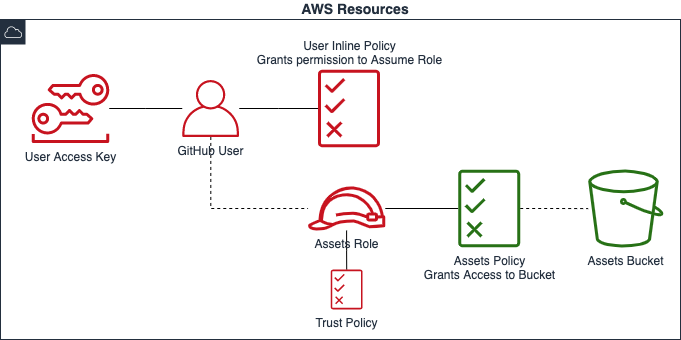
Create an IAM User and Access Keys
Goto IAM -> users -> Create user

Add the policies required for the user. I am adding limited permissions to users with
AmazonS3ReadOnlyAccess.
On the Review and Create page: review the user details and permissions. Add the Tags
Name: GitHub-Actions(optional).
we can see the
githubuser is created successfully/Click on thegithubuser
Click on the Create access key option.

Select the access keys use case as Command Line Interface (CLI). Click on Next.

The set description tag is optional. Click on the Create access key.

The access key is created. download the
.csvfile and copy those keys.
Create a GitHub Repository
Create a repository to perform Github Actions.

After creating the repository click on the code -> codespaces -> Create codespace on main.

It will create a codespace and open the Visual Studio code workspace with the repository files.

Click on the settings and then select Secrets and Variables.

Select the Actions and then click on the New Repository Secret.

Add the AWS_ACCESS_KEY to the secrets

Add the AWS_SECRETS_ACCESS_KEY to the secrets

we can view the list of secrets which are configured in the repository.

Create a basic workflow file, such as
github-aws-credentials.yml, Add the .github/workflows directory to your repository. This sample workflow will connect to the AWS. Your repository can have multiple workflows, each performing different sets of tasks. After GitHub is authenticated with the AWS credentials in the workflow, you can use AWS CLI commands in your account.Paste the following example workflow into the file.
# This is a basic workflow to help you get started with Actions
name: Connect to an AWS from a GitHub repository with AWS Credentials
# Controls when the action will run. Invokes the workflow on push events but only for the main branch
on:
  push:
    branches: [ main ]
  pull_request:
    branches: [ main ]
env:
  AWS_REGION : <"us-east-1"> #Change to reflect your Region
jobs:
  AWSConnect:
    runs-on: ubuntu-latest
    steps:
      - name: Git clone the repository
        uses: actions/checkout@v3
      - name: Configure AWS Credentials
        uses: aws-actions/configure-aws-credentials@v4
        with:
          aws-access-key-id: ${{ secrets.AWS_ACCESS_KEY }}
          aws-secret-access-key: ${{ secrets.AWS_SECRET_ACCESS_KEY }}
          aws-region: ${{ env.AWS_REGION }}
      - name: List the S3 buckets
        run: aws s3 ls
Modify the workflow to reflect your AWS account information:
- AWS_REGION: Enter the AWS Region for your AWS resources.
Push the workflow file to the repository.

Whenever we push the code to the repository, It will automatically triggers the workflow file.

The figure shows the workflow steps in which GitHub does the following:
The action configures the AWS Command Line Interface (CLI) with the provided AWS Access Key ID, AWS Secret Access Key, and AWS region.
Once configured, the AWS CLI can be used in subsequent steps of the GitHub Actions workflow to interact with AWS resources. This can include tasks such as deploying applications, managing infrastructure, or performing other AWS-related operations.
The use of
${{secrets.AWS_ACCESS_KEY_ID }}and${{secrets.AWS_SECRET_ACCESS_KEY }}ensures that sensitive information (AWS credentials) is securely retrieved from GitHub repository secrets. This is a best practice to protect sensitive data in a GitHub Actions workflow.The specified AWS region (
your-aws-region) is where the subsequent AWS CLI commands will be executed. It's essential to replaceyour-aws-regionwith the actual AWS region you want to target.This action is a crucial step in AWS-related workflows, as it sets up the necessary credentials for GitHub Actions to interact with AWS services securely. It enables the seamless integration of AWS commands within the workflow, allowing for automated deployments, infrastructure management, and other AWS tasks as defined in the workflow.

By following these steps, you establish a secure connection between your GitHub Actions workflow and your AWS account, allowing you to perform AWS-related tasks as part of your automated workflow. It's crucial to use secrets for sensitive information to prevent exposing access keys directly in your code.
Remember to keep your credentials secure and avoid hardcoding them directly in your workflow files. Using GitHub secrets provides a more secure way to manage sensitive information.
Certainly! While the traditional approach of using access keys for authentication has been widely employed, there are compelling reasons to consider moving towards OpenID Connect (OIDC).
Conclusion
In conclusion, the shift from the normal approach of using access keys to OIDC is driven by a desire for improved security, user-centricity, compliance, scalability, and ease of integration. Embracing OIDC represents a strategic move towards a more modern, standardized, and robust authentication and authorization framework in the evolving landscape of web services.
Thanks for reading! I hope you found this helpful and informative.
I'm always happy to connect with fellow tech enthusiasts and answer any questions you may have. Don't forget to follow me for more updates on tech, programming, and more.😄😄
Follow me on LinkedIn to see interesting posts like this : ) Linkedin


